
Reference
Audit and sensitive information
Use audit and operational records without exposing personal information or secrets.
Use the right record
Audit records show important security, access, and administration events. Operational logs explain service and request behaviour.
Neither record proves every business decision by itself. Use the workflow run or case history when the product work is the subject.
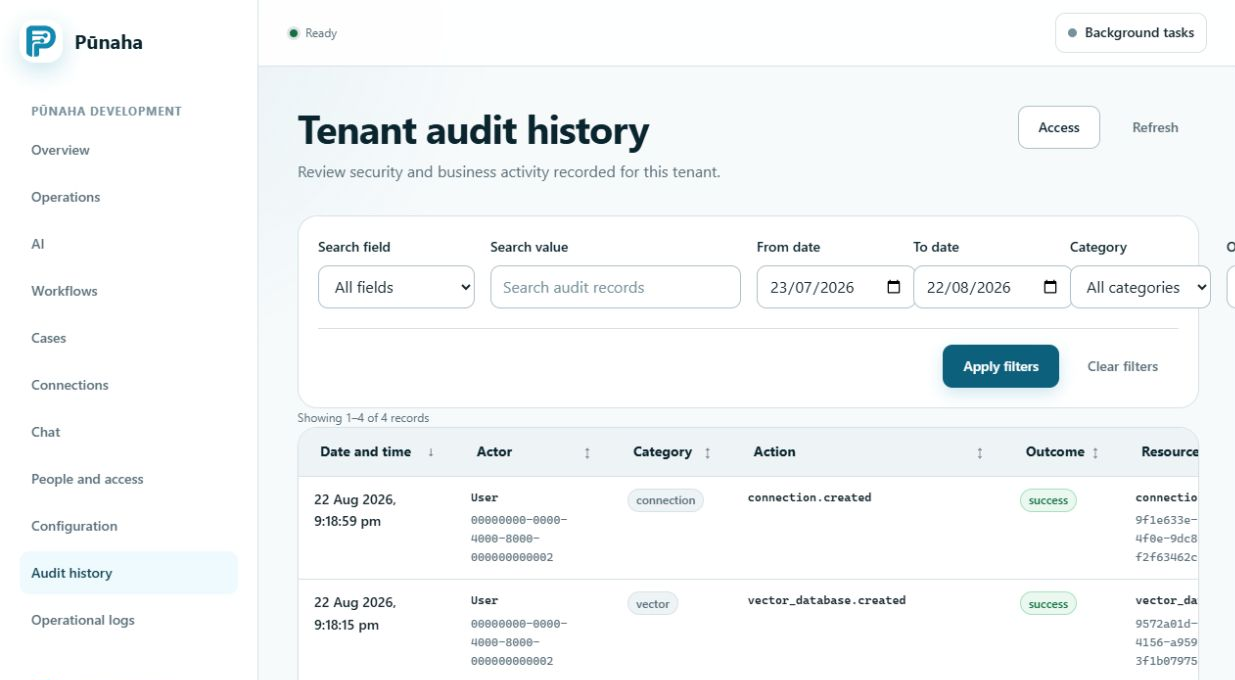
What an audit record can show
An available audit record can include the person or service, tenant, action, resource, result, time, and request ID. Coverage depends on the event recorded by the current build.
Do not claim that an event is audited until a safe test or current product evidence confirms it.
Records can be sensitive
Logs and audit records can contain names, identifiers, addresses, paths, error details, and information about access or system changes.
Limit who can view and export them. Store exports under your organisation's retention and protection rules.
Collect the minimum
- Use a short time range.
- Use one tenant and the best available ID.
- Keep only the records needed for the question.
- Remove unrelated personal or customer information before sharing when allowed.
- Use the approved secure support route.
Never add secrets to evidence
Do not put passwords, sign in codes, tokens, private keys, Connection secrets, provider keys, or database credentials into a note, screenshot, export, or support message.
If a secret may have been exposed, stop using it and follow the approved rotation and response process.
Related tasks
Read Use logs and audit records, Investigate a problem, and Operational logs and audit records.
Was this page helpful?
Your answer helps us improve the documentation.
Do not include personal information, customer information, passwords, or keys.