
Get started
Download Gemma and create your first chat
Download Gemma 4 E4B from Hugging Face, upload the GGUF model to Pūnaha, and publish a workflow you can use in Chat.
Your progress
Follow this journey
Progress is saved only in this browser.
What you will make
You will download a language model, make it available in Pūnaha, and build a workflow that answers your messages.
Chat input → Prompt → Language model → Chat output
This example uses Gemma 4 E4B Instruct for text chat. It does not need a knowledge database or an embedding model.
Download the narrated frontend walkthrough or read its transcript. These video links need an internet connection. The written guide and screenshots are included in the offline documentation.
Before you start
- Install RC1, finish first setup, and open a test tenant. Use harmless practice messages.
- Use an account allowed to manage models, create and publish workflows, and open Chat.
- Check that the AI and Workflow services are ready. For this first example, use one server with the required services.
- Allow about 5 GB for the model download and another copy on the Pūnaha server. Leave additional storage and memory for loading, context, and other services.
- Use the runtime supplied with your RC1 package. A downloaded model still needs a successful load and response test on your hardware.
Download the RC1 package and current Windows repair instructions. The recorded installation had the published Windows runtime repair applied.
RC1 registration is unavailable. Export anything you need before its 720 powered on hour allowance ends. Read RC1 availability and limits.
1. Download the correct Gemma file
A GGUF file contains model weights in the format used by Pūnaha's local runtime. Upload the model file, not a Python package or a whole repository.
- Read Google's Gemma 4 E4B Instruct model card and the linked model licence.
- Open the GGUF files published by Unsloth on Hugging Face. This example links to a fixed revision reviewed on 7 October 2026.
- Choose
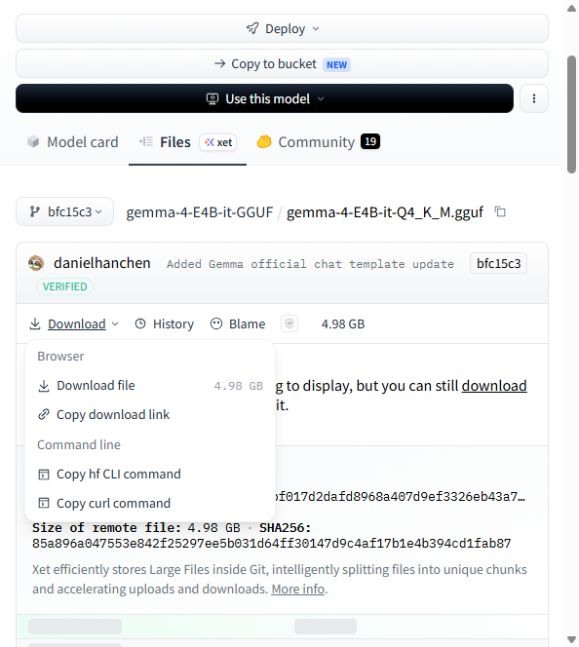
gemma-4-E4B-it-Q4_K_M.gguf, then choose Download → Download file. The file is about 4.98 GB. - Wait for the download to finish. Keep the
.ggufextension and check that the browser has not saved an incomplete download. - Do not choose a file beginning
mmprojormtp. Those are companion files, not the language model for this text chat example. Files ending.safetensorsare also not this upload format.
Q4_K_M identifies this model's quantization. Its disk size is not the memory needed to run it. The 4.98 GB download is about 4.64 GiB. Some screens display this as 4.6 GB.
Already have this file? Verify it and continue to upload. The walkthrough reuses an existing download.
Optional: verify the downloaded file
For the exact linked revision, the file has 4,977,171,584 bytes and this SHA256 value:
85a896a047553e842f25297ee5b031d64ff30147d9c4af17b1e4b394cd1fab87On Windows, open PowerShell in the download folder and run:
Get-FileHash .\gemma-4-E4B-it-Q4_K_M.gguf -Algorithm SHA256On Linux, run:
sha256sum gemma-4-E4B-it-Q4_K_M.ggufCompare the complete result. A different model revision can have a different hash. Do not continue with a partial or mismatched file.
2. Upload the model to Pūnaha
- Open the target Pūnaha server's frontend and select your test tenant.
- Open AI → Models. The page is titled Model runtime and connections.
- Check the selected server and runtime status. If it is missing, follow your package's installation or repair instructions before continuing.
- Choose Add GGUF model and select
gemma-4-E4B-it-Q4_K_M.gguffrom your computer. - Keep the page open while the upload finishes. Confirm the completed model appears in the local model list.
The model file is copied to the Pūnaha server. It runs through the local runtime. You do not need a Hugging Face API key in the local model Connection.
If the file is already listed, reuse it. Uploading the same filename again is rejected.

If the upload control is missing, open the target server's own frontend. Selecting a remote server does not enable uploading to it from another node.
3. Enable the model for workflows
- Look for the local LLM Model Connection and the uploaded model. Local discovery may have created them already.
- If there is no local Connection, choose Create connection. Give it a clear name and select LLM Model as its Provider. This is the embedded llama.cpp option.
- On that Connection, choose Discover models. Select the uploaded Gemma file and choose Enable selected models if it is not already enabled.
- Check that the Connection and model are enabled and that the model supports Chat / response generation.
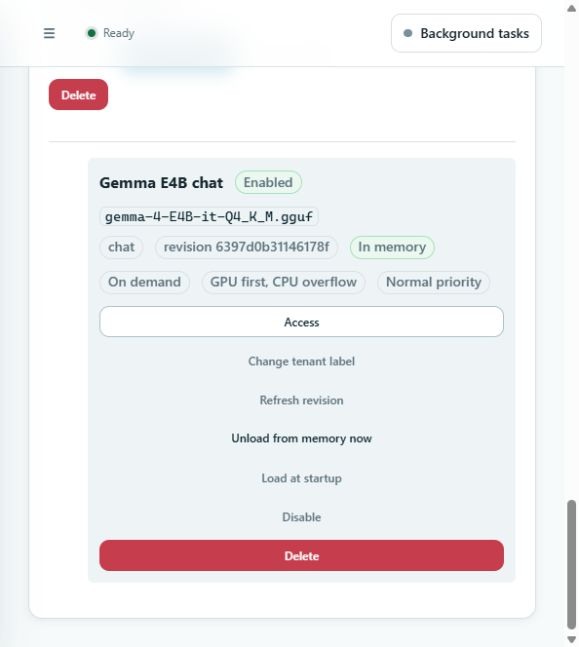
- Use Change tenant label to name the deployment Gemma E4B chat. Keep its underlying model ID unchanged.
- Choose Load into memory now and check the result. Initial loading can take time. A memory or compatibility error must be resolved before continuing.
A deployment is the model entry that a workflow can select. Uploading a file and enabling its deployment are separate checks. Load at startup is optional.
If the model already says In memory, continue without loading it again.
4. Create the chat workflow
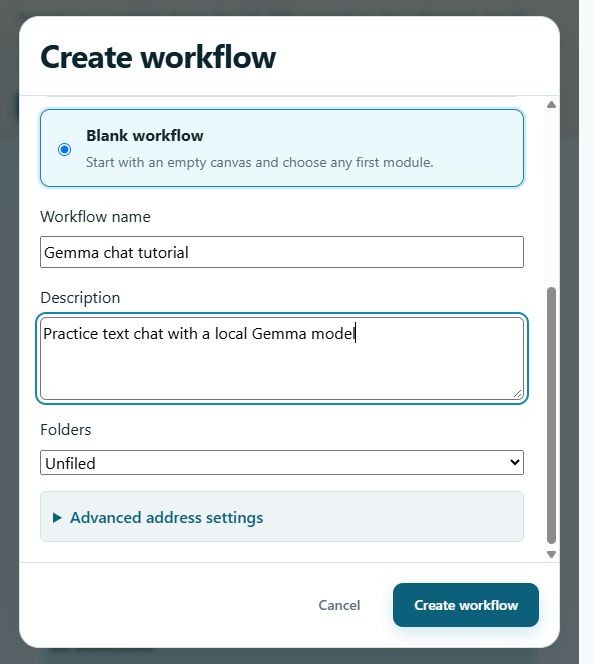
- Open Workflows, then choose Create workflow.
- Select Blank workflow. Name it Gemma chat tutorial and describe it as Practice text chat with a local Gemma model.
- Create the draft, then open it. The address is generated from the name. Use a different name if that address is already taken.
- Use Add module to add Chat input, Prompt, Language model, and Chat output.
- Check the connections. They must form one path in that order, with no disconnected module or extra branch. Keep After the previous stage selected and leave the required Protection gateway enabled.
- Open the Prompt module and enter the settings below.
System instructions
You are a helpful assistant. Answer clearly and briefly.
If you do not know, say so. Do not invent facts.
Paste this complete User prompt template. It includes the instructions in the text passed to the next module:
You are a helpful assistant. Answer clearly and briefly.
If you do not know, say so. Do not invent facts.

Conversation so far:
{{input.messages}}

Reply to the latest user message:
{{inputText}}
{{input.messages}} supplies the conversation messages. {{inputText}} supplies the latest user message. Keep both pairs of braces.
Using only {{input}} supplies the latest message. It does not pass earlier replies as context. Use the complete template above for this short conversation example.
5. Choose the model and test the draft
- Open the Language model module.
- Set Model deployment to Gemma E4B chat. Confirm that it refers to the uploaded Gemma file.
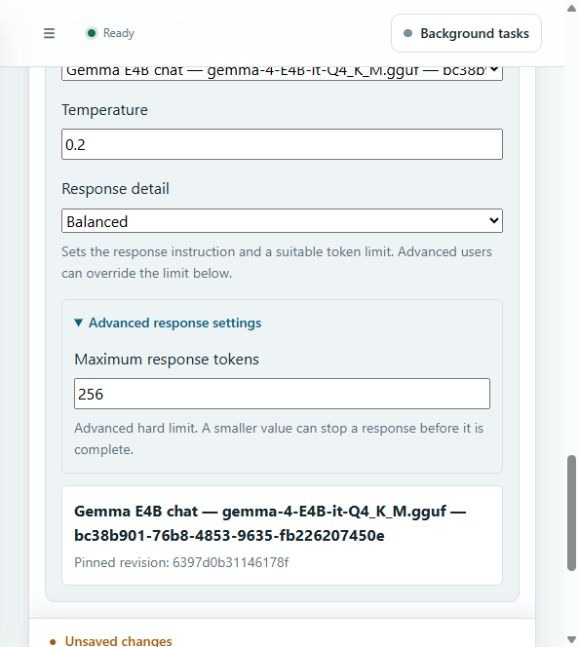
- For a short first test, use the example settings below. They are a starting point, not a model benchmark.
- Choose Save draft, then Check readiness. Resolve each reported error.
- Choose Test draft. Send In two sentences, explain what a language model does.
- Check the run result and the Language model step. You should receive a relevant answer without a model or runtime error.
| Setting | Example value |
|---|---|
| Model deployment | Gemma E4B chat |
| Temperature | 0.2 |
| Response detail | Balanced |
| Maximum response tokens | 256, under Advanced response settings |
Draft testing runs a saved draft snapshot. It does not publish the workflow. A readiness check alone does not prove that the model can generate an answer.
Keep this practice conversation short. Longer conversations need separate context and capacity testing.
6. Publish and start chatting
- After the draft test succeeds, return to Workflow design. Choose Publish version and confirm publication.
- Open Chat in the same tenant and choose Gemma chat tutorial.
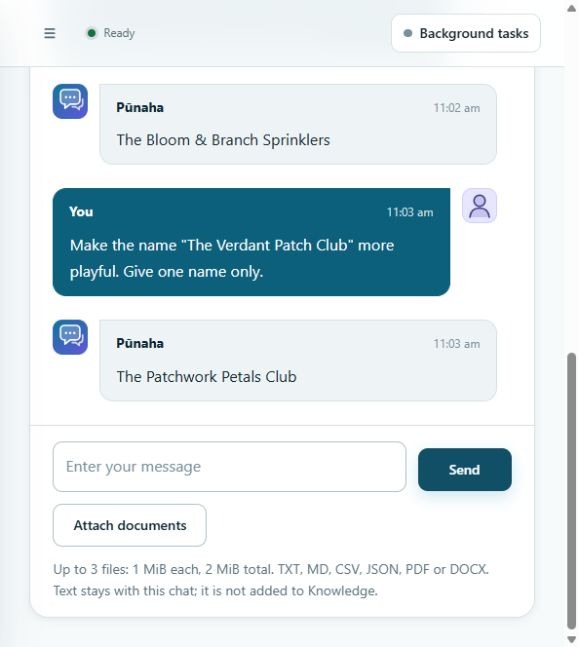
- Start a new chat and send Suggest three names for a fictional garden club.
- Read the answer. Choose one returned name and ask for a change, quoting that name explicitly.
- Check the answer and saved run. Responses vary, so check relevance and successful completion rather than exact wording.
For example: Make the name "The Verdant Patch Club" more playful. Give one name only. Replace the quoted name with one from your own answer.
Our test returned The Patchwork Petals Club. An earlier request to change "the second name" changed a different name. Quoting the intended name made the request clearer.
Chat lists published workflows. Saving or testing a draft is not enough. After changing the workflow, publish it again and start a new chat to use that version.
If something does not work
| What you see | What to check |
|---|---|
| Upload rejected or interrupted | Check the GGUF file and free server storage. RC1 accepts one file up to 32 GB. Follow the upload error before retrying. |
| Gemma is missing from Model deployment | Confirm the same tenant, enabled Connection, enabled chat deployment, and your access to it. |
| Model cannot load | Check the complete file, memory, and the package runtime's support for this Gemma architecture. Keep the error for your administrator. |
| Follow up misses earlier details | Use the complete conversation template in step 4. Publish the changed draft and start a new chat. Quote the detail you want changed. |
| Raw model data or an empty answer | Do not count this as success. Check the model step and prompt context. RC1 can display raw result data when the model returns no text. |
| Slow answer or timeout | Start with a short message and modest response limit. Check CPU or GPU use and other jobs. Ask an administrator to review capacity and timeout settings. |
| An answer stops early | Inspect the run result. A response token limit can truncate an answer. Adjust it carefully after the first short test succeeds. |
| The workflow is missing from Chat | Publish it, use the same tenant, and check Chat access and workflow Run access. |
| Normal use is restricted | Check the RC1 powered hour allowance. Registration is unavailable in RC1 and cannot restore access after its cutoff. |
Check your result
You should have one complete Gemma file, an enabled local chat deployment, a successful draft test, and a published workflow that answers in Chat.
This installed example was checked on 7 October 2026 using 0.1 RC1 (0.1.0-rc.1), Product revision decfd63165046095b38c2062725a89edd268ab35, and Windows runtime repair2.
The site header identifies the broader documentation source baseline. The installed build above identifies this tutorial's frontend test. This was an existing repaired installation, not a fresh installation acceptance test.
The video combines actual frontend screen captures with synthetic narration and captions. Pauses are shortened. Upload progress is a still from the original session. No Product screen or model answer is simulated.
Next steps
Read Run local AI models, Check and publish workflows, and Use Chat. To add document search later, read Prepare a model and knowledge database.
Sources
Model information: Google model card, Unsloth GGUF files, and Google's llama.cpp guidance. Follow the linked model terms separately from the Pūnaha licence.
Was this page helpful?
Your answer helps us improve the documentation.
Do not include personal information, customer information, passwords, or keys.